VWS1IE USER MANUAL

The VWS1IE is a highly accurate, MID approved, single phase meter, that can be used for applications such as tenant billing & renewables monitoring. This guide includes wiring instructions for installers, as well as guidance for users of the meter, enabling them to operate and take readings from the meter simply and accurately.

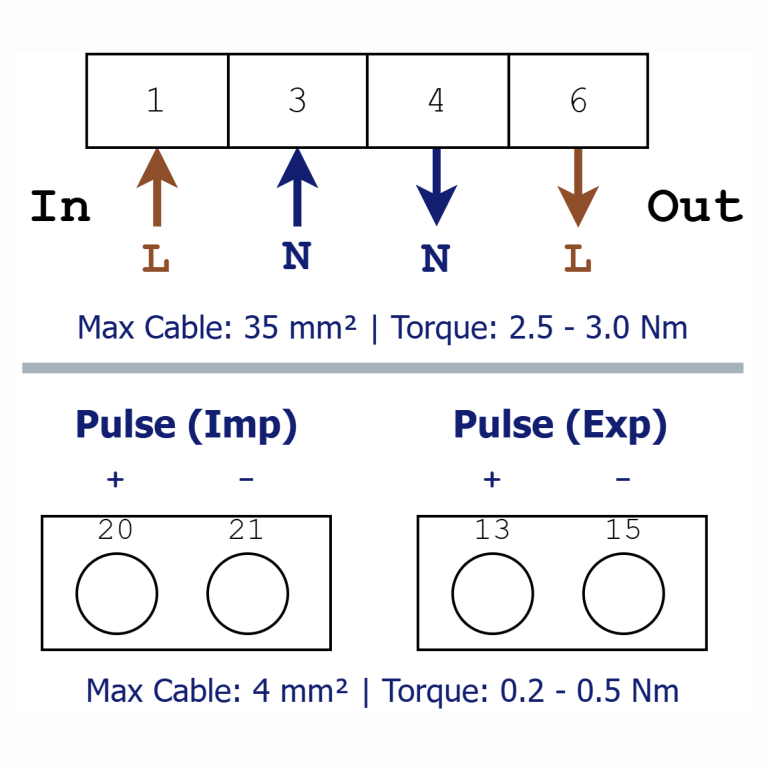
Wiring Guide

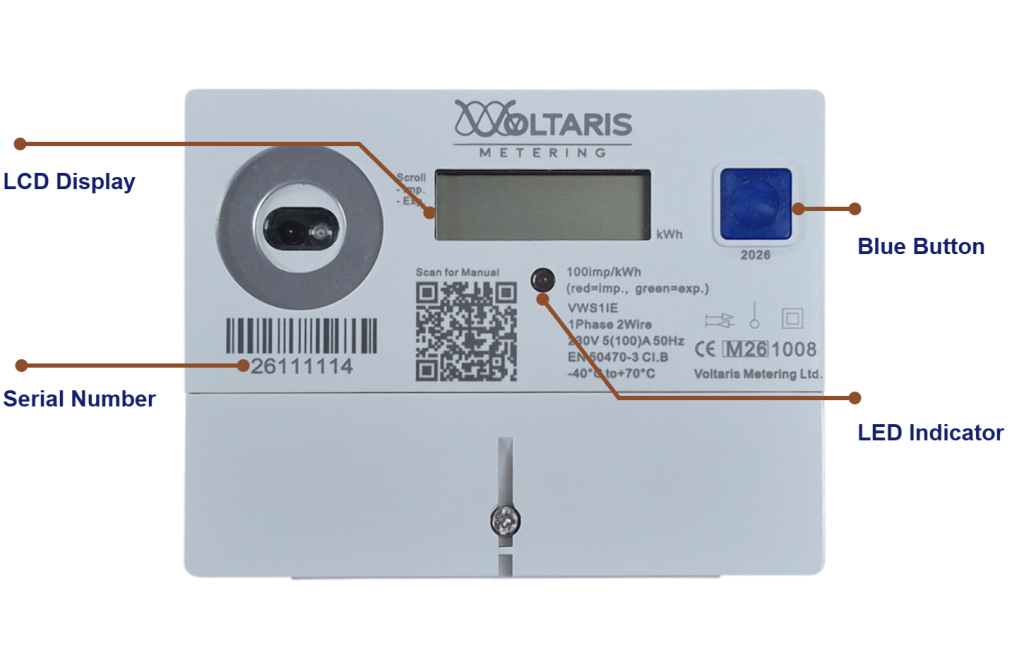
Meter Overview

How to View Readings

The screen on the VWS1IE will automatically scroll between 2 readings every few seconds:

1. Imported Energy (kWh)

2. Exported Energy (kWh)

Pressing on the Blue Button will manually scroll between these readings, as well as a screen test which displays all LCD segments.
 
If you are required to submit a meter reading, do not include the number after the decimal point, only the digits to the left.
 

Understanding Imported & Exported Energy

Whether energy is imported or exported, refers to the direction electricity flows through the meter.

  • Imported energy will usually refer to electricity that is pulled from the grid.
  • Exported will usually refer to electricity that is pushed back into the grid, e.g. when there is a surplus of solar energy generated.

However, this depends on how the meter has been wired and where it is positioned in the electrical system. For example, you may wish to identify exactly how much energy your solar panels are generating. In this instance, an import only meter could be used to accurately measure the generation, but it would need to be wired backwards.

The image below highlights the direction of energy flow through the meter, and which is classed as Imported or Exported energy.
How the LED Indicator Works

The LED beneath the display flashes in proportion to energy consumption. The LED will flash 100 times for each kWh that’s consumed, and will flash:
  • RED – to indicate imported energy.
  • GREEN – to indicate exported energy.
Example: A 2kW heater will cause the LED to flash 200 times over the period of an hour.